Getting Past OnLive's LAN Requirement
I was lucky enough to be part of the OnLive Founding Members promotion since I pre-ordered way back when the service first came around. If you were too, you might know about the current restriction in place on WiFi connections. Basically, it's a temporary means to limit the ways players can connect to the service in order to rule out connection reliability as a factor during these early stages when troubleshooting is inevitable. As far as I know, this is only meant to help cut down on the amount of calls-for-help from the technologically inapt. Imagine every noob using the service via a wireless connection flooding support forums, inboxes, and phones with problems pertaining to their network connection speed, which is totally not OnLive's problem/fault.
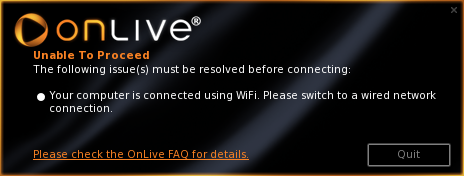
However, I don't think it's all that fair to limit those of us with prominent networking experience and wireless connections. So, I found a way past it. WARNING: Using this method of connecting to the OnLive service will most likely make you ineligible for support from OnLive until either wireless connections are supported or you actually connect through LAN. YOU HAVE BEEN WARNED!
The fix is very simple and can be done on Windows Vista or 7 (perhaps other versions as well, but I haven't been able to verify). Follow these steps:
- Right click your network connection icon in the notification area, then choose Open Network and Sharing Center.
- OR open your Control Panel, click the Network and Internet category, then Network and Sharing Center.
- Click Change adapter settings in the left pane.
- Select the wireless network connection you use to connect to the Internet and an unused local area connection (click one, hold CTRL, then click the other).
- Right click one of the selected items and choose Bridge Connections. A Network Bridge item should be created.
Enjoy! The only real side effect I noticed about this procedure is that your network connection icon may display the disabled/unconnected icon even if you are fully connected to the network and Internet. If you don't mind that, this work-around is pretty solid. When OnLive adds WiFi support or if you decide you want your LAN connection back, just go back into the adapter settings and delete the network bridge item.
PS: Add me as a friend or spectate me sometime! My gamertag is Blakeo_x.
